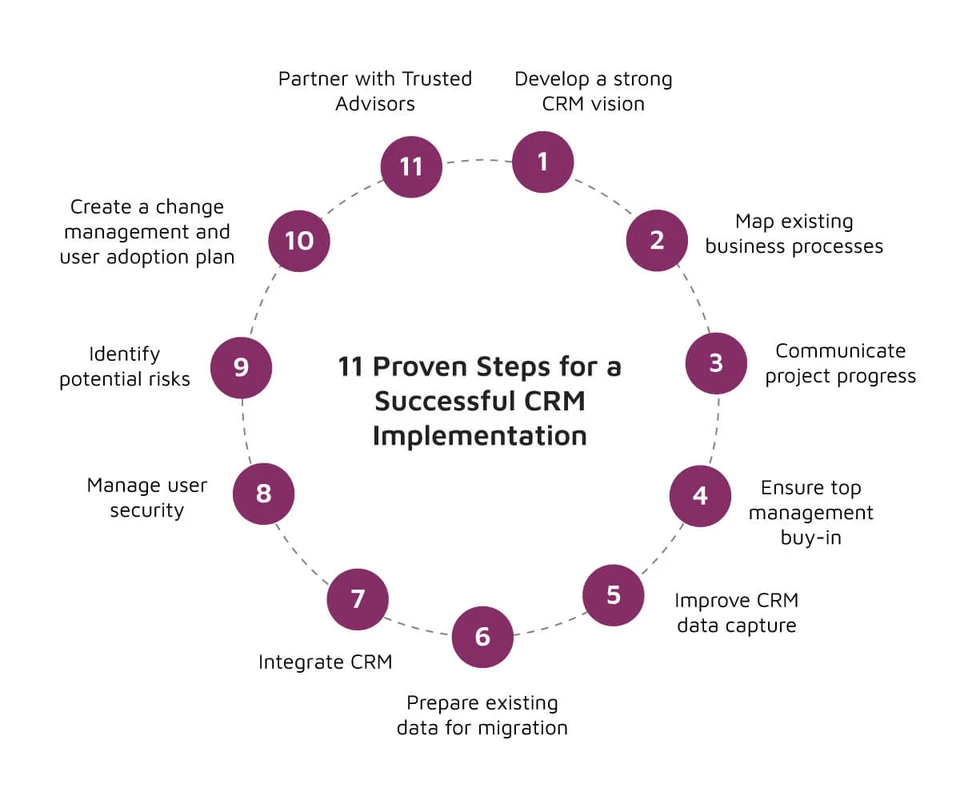
A successful CRM implementation transitions customer operations into a unified system of record without disrupting live sales pipelines or corrupting customer data. Whether deploying a lean CRM over one to three months or an enterprise platform across six to twelve months, project success depends on cross-functional governance, rigorous pre-migration data hygiene, and role-specific training rather than the software platform itself.
Evaluating outcomes across 500+ deployments, Luke Marthinusen of MO Agency observed: “The difference between those two outcomes almost never comes down to the CRM platform you choose. It comes down to how you implement it.” When sales operations, project managers, and technical leads manage rollout as a structured operational overhaul rather than a passive software installation, they preserve data integrity, protect revenue velocity, and secure lasting organizational adoption.
Establish Project Governance and SMART Milestones
Launching a CRM deployment without clear business objectives risks unmeasurable return on investment, loss of team focus, and uncontrolled configuration complexity. Successful implementations establish clear accountability structures and quantifiable targets before software configuration begins.
Operational governance relies on a Three-Tier Implementation Leadership Model that divides executive, strategic, and functional responsibilities:
- Executive Sponsor: An executive leader who authorizes project funding, aligns the system with broader corporate strategy, and leads the company-wide launch announcement.
- Dedicated CRM Manager: A central project lead who manages cross-functional execution, directs vendor and development teams, tracks delivery milestones, and resolves daily operational blockers.
- Departmental Key Users: Operational super-users embedded within sales, marketing, and customer support teams who define functional requirements, validate day-to-day usability, and serve as frontline peer advocates.
Technical delivery teams require dedicated cross-functional expertise. Software engineering provider Itransition emphasizes that standard implementation units must combine business analysts, CRM developers, UX/UI designers, and quality assurance testing engineers. For specialized architectures, teams also integrate artificial intelligence engineers to handle predictive workflow design.
Once leadership is established, define operational milestones using the SMART framework (Specific, Measurable, Achievable, Relevant, Time-bound). Vague goals such as “improving rep efficiency” lead to scope creep and disjointed customizations. Instead, anchor the project to clear targets. For example, Itransition frameworks establish targets such as shortening the average sales cycle by 20% within 6 months of go-live. Establishing concrete baseline metrics early gives the governance committee measurable criteria to assess configuration decisions, evaluate change requests, and verify bottom-line business value.
Audit and Cleanse Data Before System Migration
To cleanse data before CRM migration, audit all legacy records for duplicates, formatting errors, and obsolete contacts. Establish standardized field validation rules, eliminate inactive accounts with no activity within 24 months, and map custom properties directly to existing sales stages. Clean data early to eliminate weeks of troubleshooting post-import.
Migrating messy legacy records into a pristine environment degrades pipeline visibility, disrupts automated sequences, and immediately diminishes rep confidence. Steli Efti, co-founder and CEO of Close, emphasizes the direct operational cost of poor preparation:
“A new CRM is useless if your data and process aren’t updated and ready for your team to use. Spend a few hours cleaning up your data early on, and you could save weeks in the CRM implementation process down the road.”
Execute pre-migration data hygiene through three discrete phases before scheduling any bulk database uploads:
- Record Normalization and Deduplication: Standardize corporate naming conventions, normalize state and country values to ISO standards, standardize phone number formats, and merge duplicate records using corporate email domains and tax identifiers.
- Legacy Pruning: Archive inactive prospects and accounts that have shown zero recorded sales activity or touchpoints within the last 24 months. Removing obsolete data minimizes database storage overhead and prevents outbound teams from working dead leads.
- Process and Property Mapping: Audit legacy custom properties against verified sales activities. Deprecate redundant fields and map remaining data points directly to defined pipeline stages, ensuring that imported contacts align with actual customer journeys.
Select Your Cutover Strategy: Phased Rollout vs. Big Bang
The cutover strategy defines how an organization transitions operations from legacy infrastructure to the new CRM environment. Choosing between a Big Bang replacement, a Parallel Run, or a Phased Regional/Departmental rollout requires balancing operational downtime risks against internal staffing capacity.
Cutover Strategy |
Typical Deployment Timeline |
Operational Risk Level |
Internal Staff Bandwidth Required |
Rollback Feasibility |
|---|---|---|---|---|
Big Bang Cutover |
1 to 3 months |
High |
Moderate (concentrated during launch window) |
Low (complex and disruptive once live data flows) |
Parallel Run |
3 to 6 months |
Low |
High (dual-entry demands on sales and IT teams) |
High (legacy platform remains fully operational) |
Phased Implementation Rollout |
6 to 12 months or more |
Low to Moderate |
Moderate (distributed sequentially across teams) |
Moderate (reversion isolated to specific business units) |
The matrix above illustrates the core architectural trade-offs that technical leadership must weigh before committing resources. While swift transitions reduce software license overlap, they introduce operational exposure that larger enterprises rarely tolerate.
Evaluating Cutover Risk Across Organization Sizes
Leaner businesses with straightforward sales motions often favor a Big Bang cutover, executing migrations within 1 to 3 months. In these environments, operational workflows are relatively simple, making a coordinated weekend cutover manageable with minimal disruption.
Conversely, enterprise organizations with complex operations require 6 to 12 months or more to deploy, making a phased framework essential. For example, enterprise compliance specialist J. J. Keller executed a phased SAP NetWeaver BI rollout to manage organizational risk across distinct operating divisions. Phasing rollouts by business unit, brand, or geographic region isolates operational changes. This allows technical teams to validate custom integrations, refine training curricula, and stabilize workflow automation in one business unit before expanding across the broader enterprise.
Master Data Subscribing Rules and Abort Triggers
During a parallel run or phased migration, maintaining database integrity requires a strict Master Data Subscribing Structure. Under this architecture, the new CRM acts as the authoritative master system of record for all customer contacts and account updates. Legacy databases function as read-only subscriber copies fed by automated, scheduled interface synchronization feeds until final decommissioning. This prevents dual-entry discrepancies and eliminates race conditions where conflicting updates overwrite valid contact information.
Enterprise deployments must establish objective, quantitative abort triggers before the cutover window opens:
- Data Synchronization Error Threshold: If record synchronization error rates exceed 2% across critical account and pipeline tables during pre-cutover testing, cancel cutover immediately.
- Field Integrity Validation Failure: If staging validation checks reveal more than 500 orphaned contacts or corrupt deal associations, trigger a complete rollback.
- Cutover Window Overrun: Establish a fixed data freeze window (e.g., Friday at 6:00 PM to Sunday at 6:00 PM). If data ingestion and validation are not completed four hours prior to Monday morning business operations, abort deployment and revert DNS routing to the legacy platform.
Configure Core Workflows and Integration Middleware
Gartner findings show that 70% to 80% of CRM investments are directed into SaaS solutions. Modern deployments emphasize composable architectures and visual design environments rather than heavy, hardcoded software customizations. Agentic no-code platforms, such as Creatio, reduce deployment complexity by pairing pre-built visual elements with AI-assisted process automation to configure business stages and operational gates.
Salesforce documentation highlights that modern AI-driven CRMs automate routine administrative work and surface predictive deal scoring beyond basic contact storage. Similarly, sales platform Close reports that implementing automated conversational and communication logging tools can save sales representatives 8+ hours weekly in manual record-keeping. To achieve these efficiency gains without introducing system instability, configure integration middleware following an established sequence:
- Establish System Boundaries and Sync Directions: Define which platform governs specific data entities. For instance, set ERP as the master for customer billing terms and invoicing histories, marketing automation as the master for top-of-funnel lead attribution, and the CRM as the master for active deal stages and account interactions.
- Implement Middleware API Rate Limiting and Queuing: Protect downstream endpoints by routing integrations through dedicated middleware. Configure exponential backoff algorithms and batch queues to prevent API throttling during high-volume data updates.
- Program Webhook Fail-Safes and Circuit Breakers: Configure webhook listeners to catch dropped payloads during network interruptions. Implement automated retry routines that store failed JSON payloads in a dead-letter queue for review rather than dropping transactions.
- Enforce Master Data Management Conflict Resolution: When bidirectional updates occur simultaneously, use deterministic timestamp rules: the most recent verified user edit takes precedence, unless the change touches protected financial properties reserved exclusively for the ERP system.
A frequent integration failure occurs when technical teams attempt to build analytical business intelligence reporting cubes directly on top of temporary flat files or unstable staging tables. Transactional database feeds must be fully mapped, verified, and stabilized in production before enterprise analytics teams extract reporting pipelines. Skipping this stability period creates distorted dashboards that misinform leadership and erode confidence in the new system.
Execute Role-Based Training to Secure User Adoption
Drive CRM adoption by delivering role-specific, contextual training focused on daily sales workflows rather than generic feature tours. Train key departmental users first to serve as tier-one champions, provide interactive sandbox exercises for pipeline updates, and tie enablement milestones directly to real sales activities to prevent abandonment.
User adoption challenges cause more CRM implementation failures than technical software limitations. Across 500+ successful implementations, Luke Marthinusen of MO Agency observed that project outcomes depend on the execution of the rollout rather than the software platform selected. When sales teams are overwhelmed with complex menus and irrelevant fields, they revert to private spreadsheets, leaving the CRM starved of real-time pipeline data.
Effective enablement abandons broad platform walkthroughs in favor of role-tailored workflow simulations:
- Sales Development Reps: Train exclusively on lead intake queues, call-logging interfaces, cadences, and meeting booking modules.
- Account Executives: Focus sessions entirely on advancing deal stages, generating price quotes, updating expected close dates, and tagging primary decision-makers.
- Customer Success Managers: Structure enablement around account health score monitoring, onboarding handoff checkpoints, and contract renewal notifications.
Departmental Key Users should complete training two weeks prior to the wider team. When frontline staff encounter challenges during the critical first 30 days post-launch, having trained peer super-users available on their immediate teams resolves issues faster than remote IT ticketing queues.
Complement training by streamlining the user interface. Default CRM layouts often expose dozens of administrative and system properties that crowd out daily work. Hide non-essential administrative fields from daily views, configure touch-friendly interfaces for reps managing deals on mobile devices, and place primary action buttons—such as logging calls and creating deals—front and center on the user dashboard.
Monitor Behavioral Adoption and Prevent Schema Bloat
A CRM deployment does not conclude on the official go-live date. Technical consultancy Euclidz Technologies points out that the primary issue is rarely the software itself: most failures stem from planning mistakes, weak adoption strategies, poor data management, or insufficient training. A CRM must be governed as an ongoing operational initiative rather than a one-time IT milestone.
Shaun Taberer, Senior Project Manager and Solutions Consultant at Faye—an organization that cataloged 25 common reasons why CRM deployments struggle—reinforces the need for continuous optimization:
“A great CRM isn’t the result of a single, perfectly executed implementation. Instead, ongoing refinements, revisions, and expansions lead to success. The CRM is never “perfect” because your business is always changing.”
Tracking daily logins is a poor way to assess real adoption. Reps can easily open a browser tab every morning without actively logging deals or customer communication. Instead, monitor behavioral telemetry metrics:
- Pipeline Stage Dwell Time: Track how long opportunities remain in each sales phase. Extended, unexplained dwell times often indicate that reps are updating the CRM only right before management reviews.
- Field Completion Ratios: Measure the fill rate of essential qualifying properties on closed-won deals. Consistent empty values reveal workflow friction that requires training or field simplification.
- Mobile and Direct Activity Capture: Measure the ratio of outbound calls, emails, and meetings logged through official mobile or desktop CRM integrations against total logged activities. High rates of manual, retrospective logging suggest that teams find the standard interface cumbersome.
Technical steering committees should track these adoption signals using executive status dashboards that apply clear green, yellow, and red risk indicators to pipeline integrity, integration error rates, and user utilization across each department.
Shortcut: Prevent schema bloat by establishing a formal field creation policy. Require department leads to submit a brief business justification before any new custom property is provisioned in production. Schedule an automated audit every 90 days to identify any custom field with a zero-fill rate across 100 consecutive records. Flag those unused properties and safely archive them to keep the operational interface clean and manageable.
FAQ
How long does a standard CRM implementation take from start to finish?
CRM implementation timelines depend on organizational complexity and technical scope. Small-business deployments with standard pipelines typically take 1 to 3 months. Enterprise rollouts involving custom ERP integrations, legacy data migrations, and multi-department governance generally require 6 to 12 months or more to execute safely.
What is the primary cause of CRM implementation failures?
CRM failures rarely stem from software limitations. Observations from 500+ deployments show that projects fail primarily due to organizational issues: weak executive governance, migrating uncleaned legacy data, generic training programs, and poor change management that leads end users to abandon the platform.
How should organizations handle data synchronization conflicts during parallel runs?
Establish a Master Data Subscribing Structure. Designate the new CRM as the primary master system of record for account and contact data, while maintaining legacy databases as read-only subscriber copies fed by scheduled interface feeds until final decommissioning. This setup prevents conflicting dual-entry updates across platforms.
How can teams prevent CRM schema bloat and field clutter post-launch?
Treat the CRM as an evolving operational asset. Establish a schema governance committee requiring formal business approval for new properties. Run automated 90-day audits to identify custom fields with zero-fill rates or obsolete tags, archiving unused properties before they clutter layouts and confuse sales reps.